

🧠 LLM Parsing Models
Airparser allows you to select the parsing model for each Inbox independently. This means you can fine-tune the parsing performance for different document types without affecting other inboxes.
You can change the model at any time from the Inbox settings page.
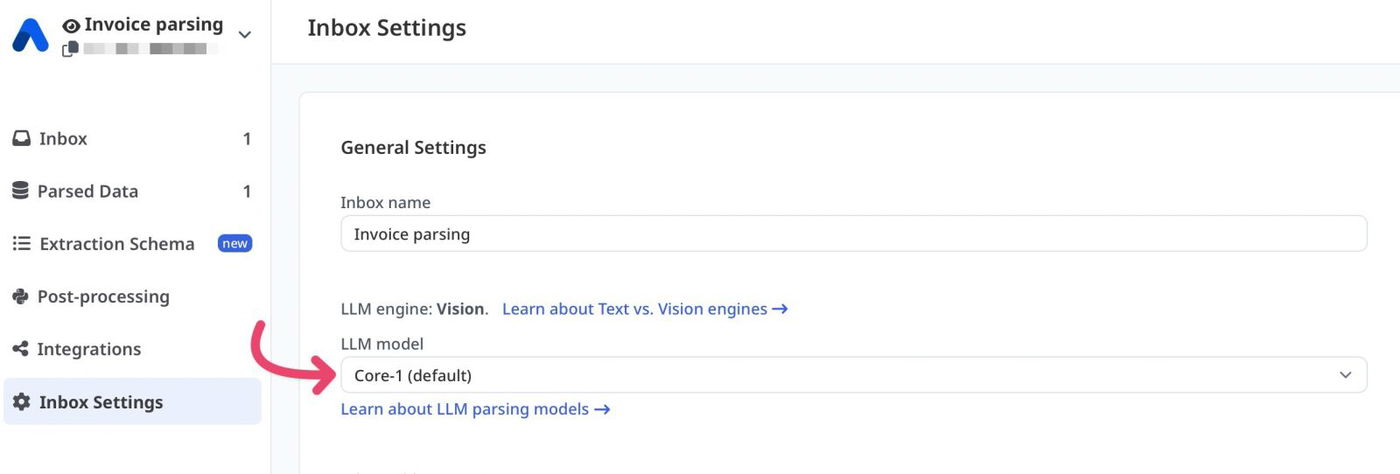
How to choose the right model
Not sure? Keep the default: Flex-1 for Vision inboxes and Core-1.5 for Text inboxes. Switch only if the results are not good enough.
Your documents | Recommended model | Why |
|---|---|---|
Phone photos, scans and images | Core-beta or Flex-1 (Vision engine) | Most accurate on small print, long numbers and tilted or sideways pages. Core-1, Core-1.5 and Flex-1.5 are weaker on photos: they may leave fields empty or guess values. |
Regular PDFs and emails with selectable text | Core-1.5 (Text engine) or Flex-1 (Vision engine) | Every model handles these well. Core-1.5 is fast and accurate. |
Dense tables, many pages, complex layouts | Core-beta | Highest accuracy in our tests. |
Very long documents | Core-beta or Flex-1.5 | Support the longest documents. |
If the results are still not satisfactory, try Core-beta, then Flex-beta.
Model comparison
Model Name | Speed | Long documents | Photos and scans | Description |
|---|---|---|---|---|
Core-1 | ⭐️⭐️⭐️⭐️ | ⭐️⭐️⭐️ | ⭐️⭐️ | Fast, well-balanced model for regular documents with selectable text. |
Core-1.5 (default for Text inboxes) | ⭐️⭐️⭐️⭐️ | ⭐️⭐️⭐️ | ⭐️⭐️ | Our default for Text inboxes. Fast and accurate on regular documents. |
Core-beta | ⭐️⭐️⭐️ | ⭐️⭐️⭐️⭐️⭐️ | ⭐️⭐️⭐️⭐️⭐️ | Best for photos and scans, dense tables, complex layouts and very long documents. |
Flex-1 (default for Vision inboxes) | ⭐️⭐️⭐️⭐️ | ⭐️⭐️⭐️⭐️ | ⭐️⭐️⭐️⭐️ | Our default for Vision inboxes. Accurate on photos, scans and regular documents; a little slower than the Core models. |
Flex-1.5 | ⭐️⭐️⭐️ | ⭐️⭐️⭐️⭐️⭐️ | ⭐️⭐️ | Handles very long documents. Less reliable on photos and scans. |
Flex-beta | ⭐️⭐️⭐️ | ⭐️⭐️⭐️⭐️ | ⭐️⭐️⭐️⭐️ | Latest Flex model. Accurate on photos and scans; a good option to try when the Core models struggle. |
Tip: If you use the Confidence Scores meta field, note that the scores also power the Human-in-the-Loop Review feature, which can hold low-confidence documents for manual approval.
What are parsing models?
Parsing models are the AI engines that process your documents and extract structured data. Airparser supports two families of advanced LLM-powered models:
Core family – our main, general-purpose models.
Flex family – alternative models that sometimes perform better for specific layouts or formats.
In many cases, the parsed output will be identical across models—especially within the same family.
However, results can vary slightly between families, as they use different approaches to document understanding.
Our default models, Flex-1 (Vision inboxes) and Core-1.5 (Text inboxes), cover most use cases and document types.
If they work well for your documents, we recommend keeping them.
Document size
Each model supports documents up to a certain length (measured in tokens, which roughly correspond to words and formatting).
Higher document size means the model can process longer documents.
However, keep in mind that longer processing can increase the risk of hallucinations - cases where the AI fabricates or misinterprets data.
For best accuracy, we recommend splitting very long documents into smaller sections whenever possible.